Your golf sim,
in your hand.
SimPal turns your iPad or phone into a remote, a live screen and a smart caddie for your simulator. Every shot is captured automatically, with no extra hardware.
Everything your bay was missing
Stop walking to the keyboard. Stop squinting at the screen. SimPal puts the controls, the game and your numbers right where you're standing.
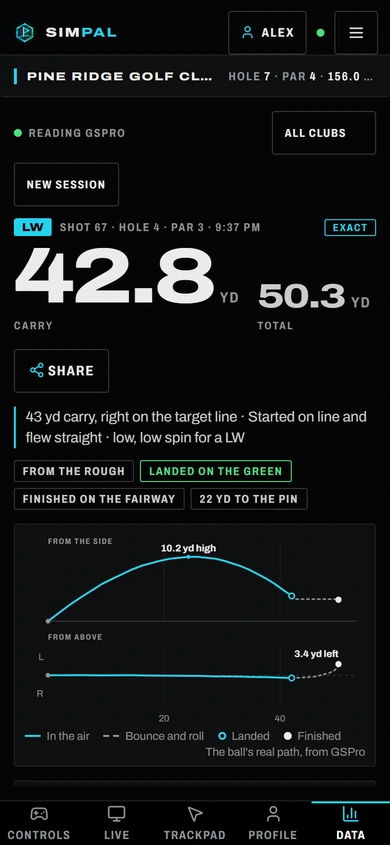
Full remote control
Aim, clubs, mulligans, flyovers, camera views, green reading and more. Every GSPro shortcut, one tap away, with your device's own keyboard for typing.
Live View
See your game on the tablet and tap the screen to click inside GSPro. Menus, drops and the mini-map all become touch.
Exact shot data
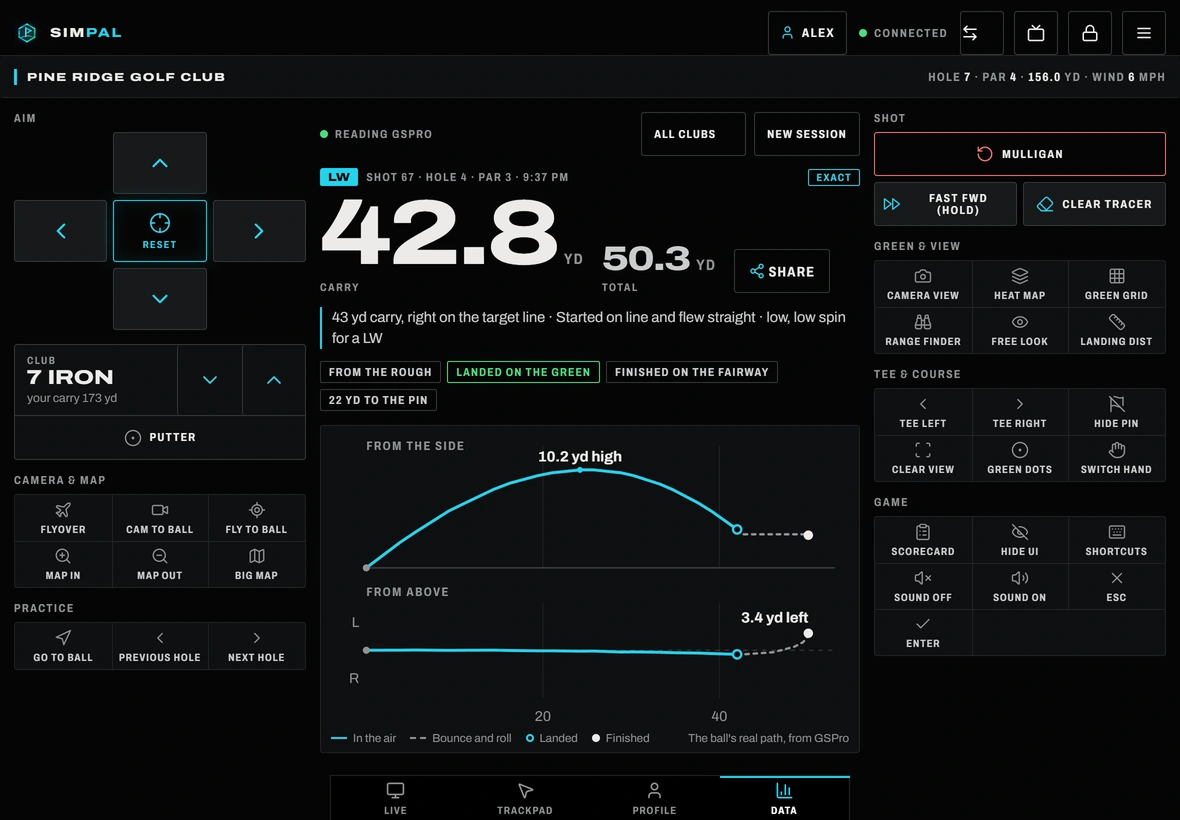
Every number GSPro records for a shot, saved the moment you hit: carry, speed, spin, launch, club path, face angle and the ball's real flight path.
Practice coach
Finds where your strokes go from your own shots, gives you three short guided sessions a week, scores every ball and tests whether you're really improving.
My game
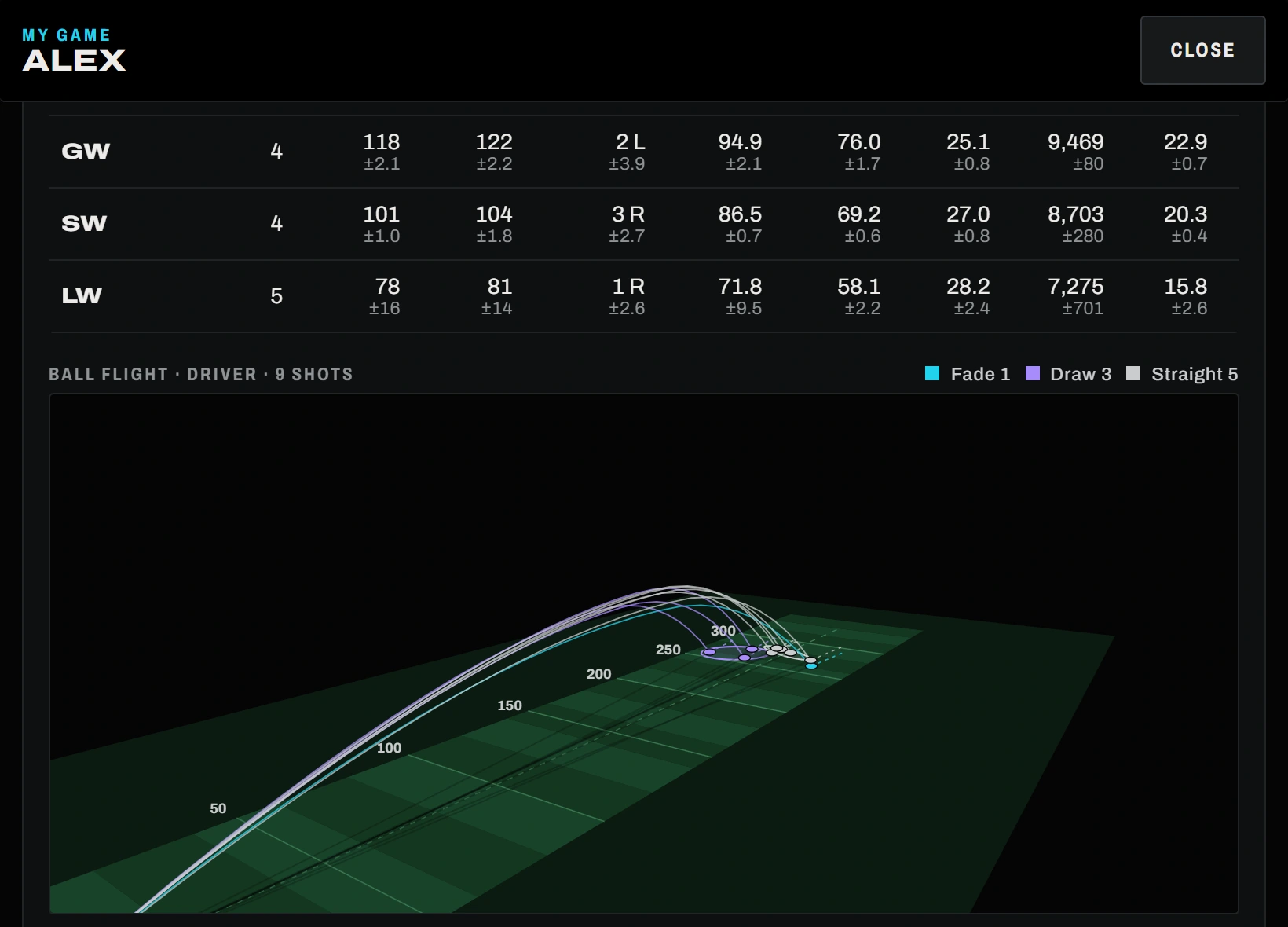
Strokes gained, every club compared, fades against draws, and your shots flying in 3D over a fairway. On your phone, tablet or computer.
Weekly events and a handicap
One course each week. Play it and your round is your entry: gross, net and 2-man scramble leaderboards, plus season points.
Scramble caddie
Playing a scramble? Once your team has hit, SimPal shows which ball is the one to play and why, with every ball's numbers a tap away.
Personal caddie
Knows the distance to the pin and how far you actually hit every club, then tells you which one to pull.
Rounds and course records
Every GSPro round gets a scorecard and counts for course records by tee box, with separate team records for scrambles.
Watch it leave the club
SimPal saves the ball's real path from GSPro, so you can see every shot fly, land and roll, and compare your whole bag.
Example shots. In the app these are your own, straight from GSPro's record of each one.
One app for the whole bay
From the first tee shot to the practice plan that follows. Real screens from SimPal.
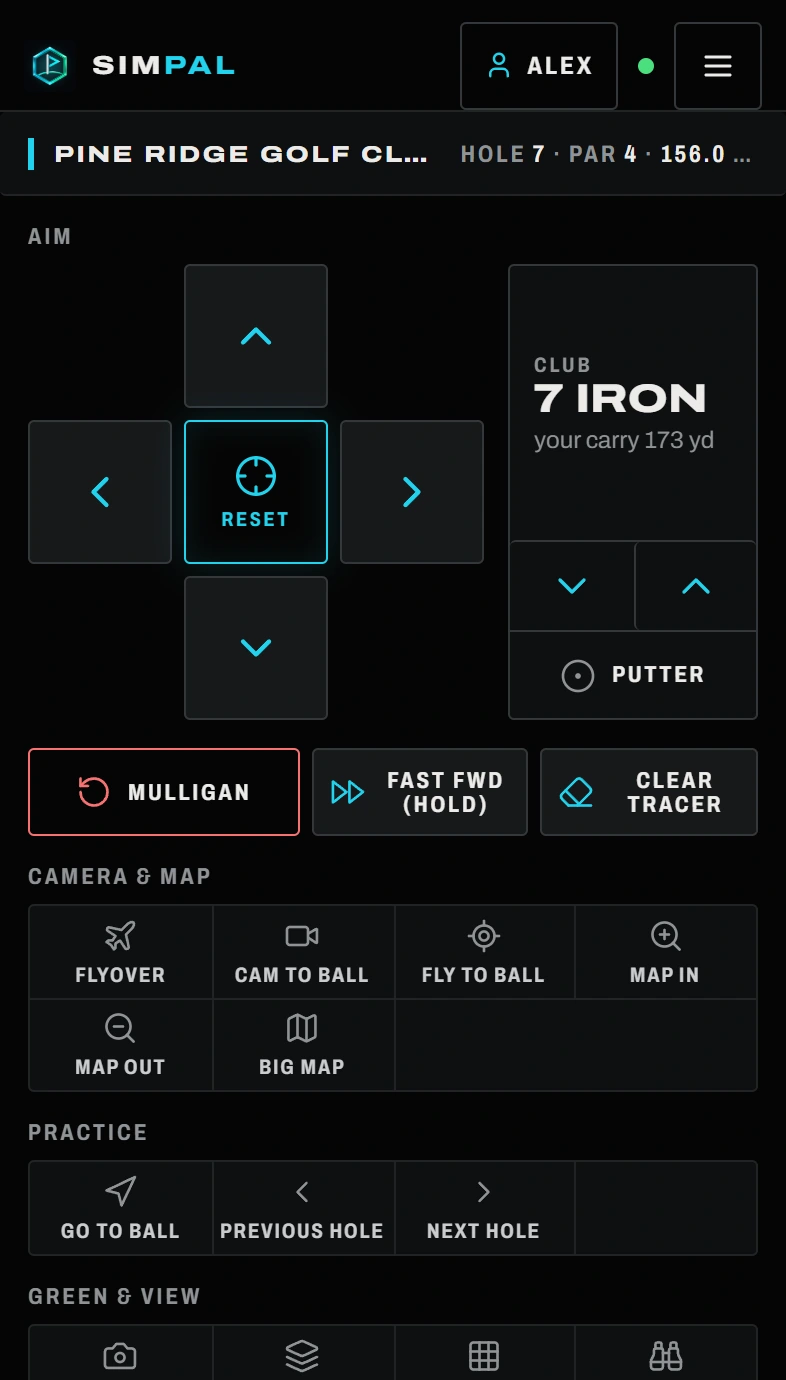
One hand. Every control.
Big buttons made for use between shots. Aim, change clubs, take a mulligan, fly the hole. Rearrange them and pin your favorites.
- Live View: watch the game and tap inside GSPro
- Type into GSPro with your phone's own keyboard
- Layouts made for phones, tablets and PCs
Your numbers, the moment you hit.
No exporting, no spreadsheets. Every shot arrives with GSPro's exact numbers and its real flight path.
- Every club compared, with how much it varies
- Fades against draws, side by side
- Turn the view and tap any shot
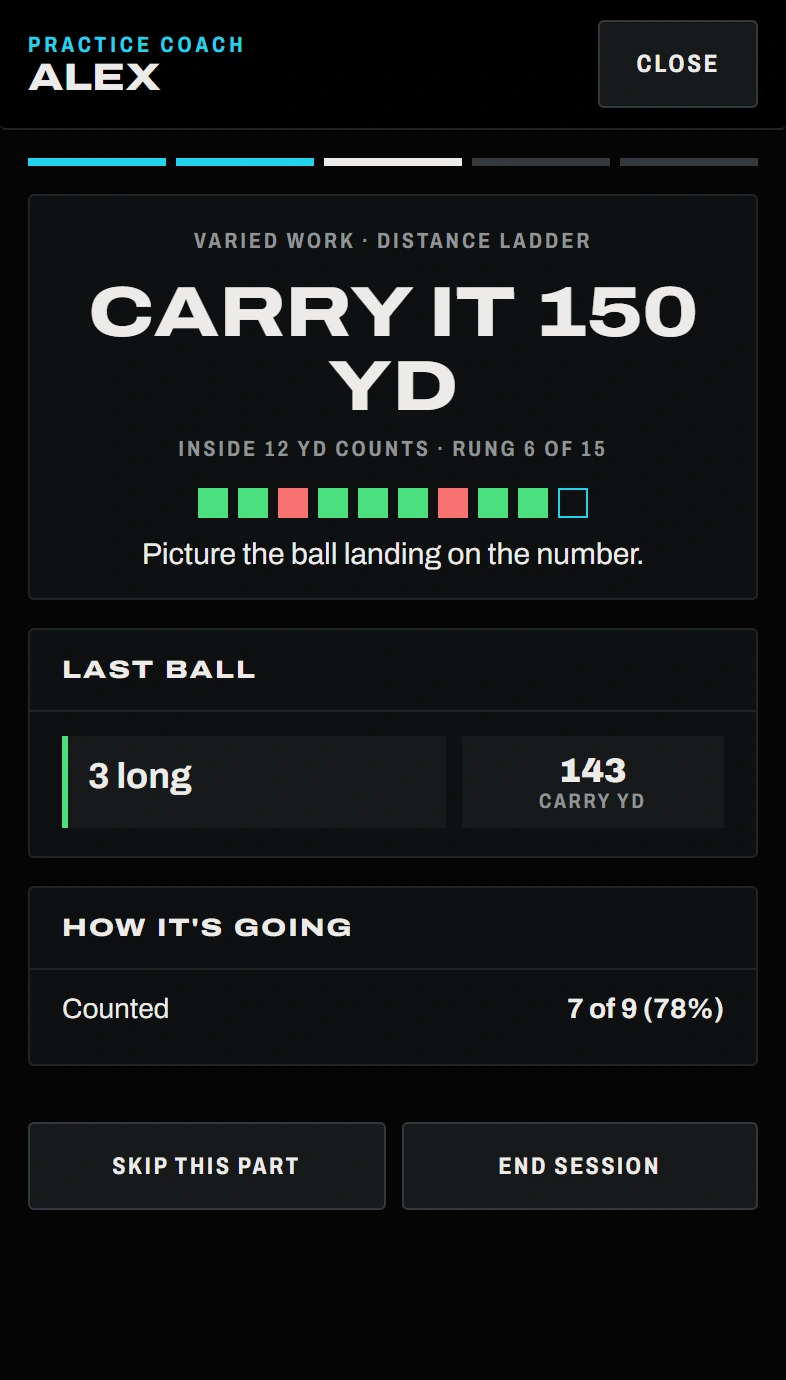
A coach that works from your shots.
It finds where your strokes go, plans three short sessions a week and calls every target. Built on a sourced study of how golfers actually improve.
- Scores every ball and adjusts the difficulty
- Shows the numbers behind every piece of advice
- Tests real progress, with a margin of error

A reason to play every week.
One course a week and nothing to sign up for. Play it with SimPal running and your round is your entry.
- Gross, net and 2-man scramble leaderboards
- A SimPal handicap from your own rounds
- Season points from every finished event
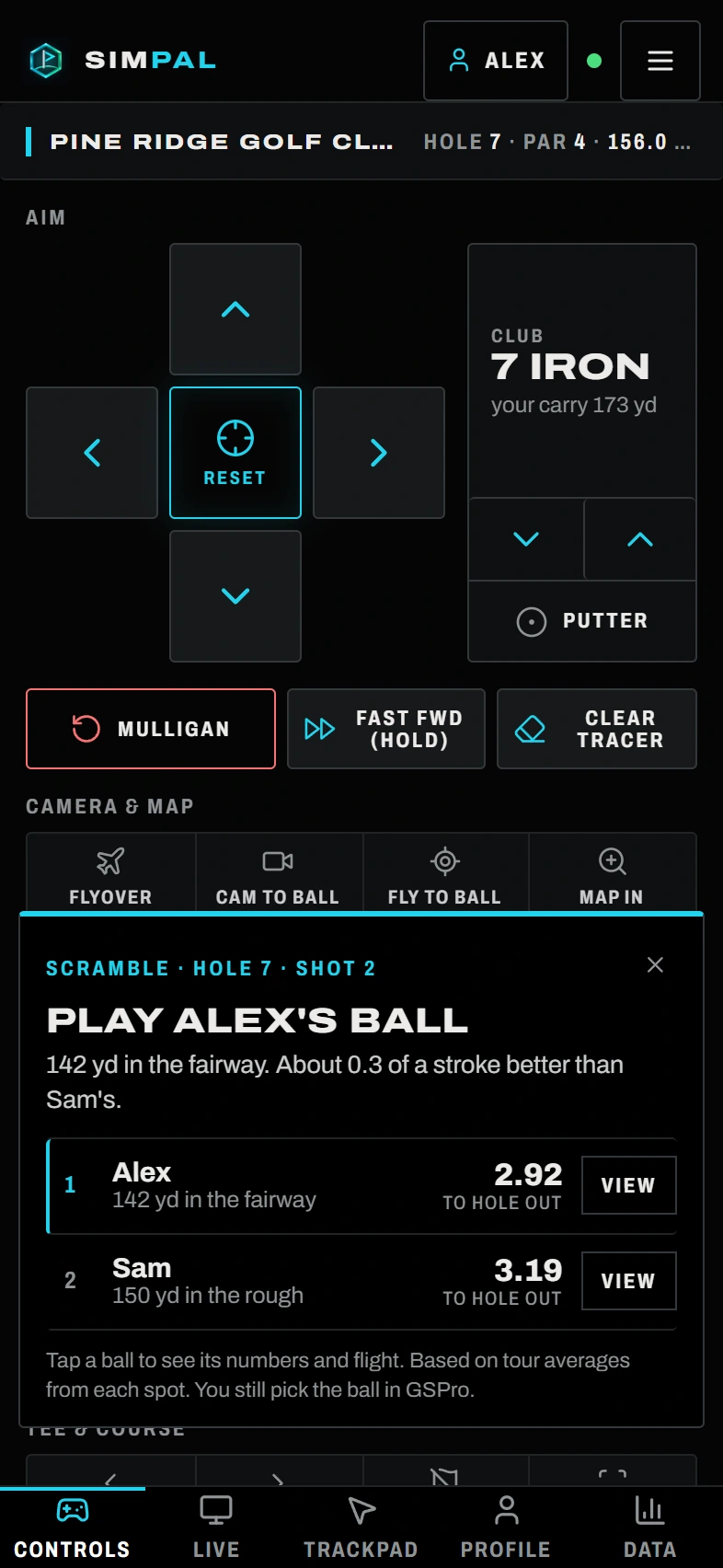
Know which ball to play.
In a scramble, SimPal compares your team's shots as they land and says which one leaves the fewest strokes.
- Distance and lie for every ball
- Tap a ball for its numbers and flight
- Scramble rounds post as one team score
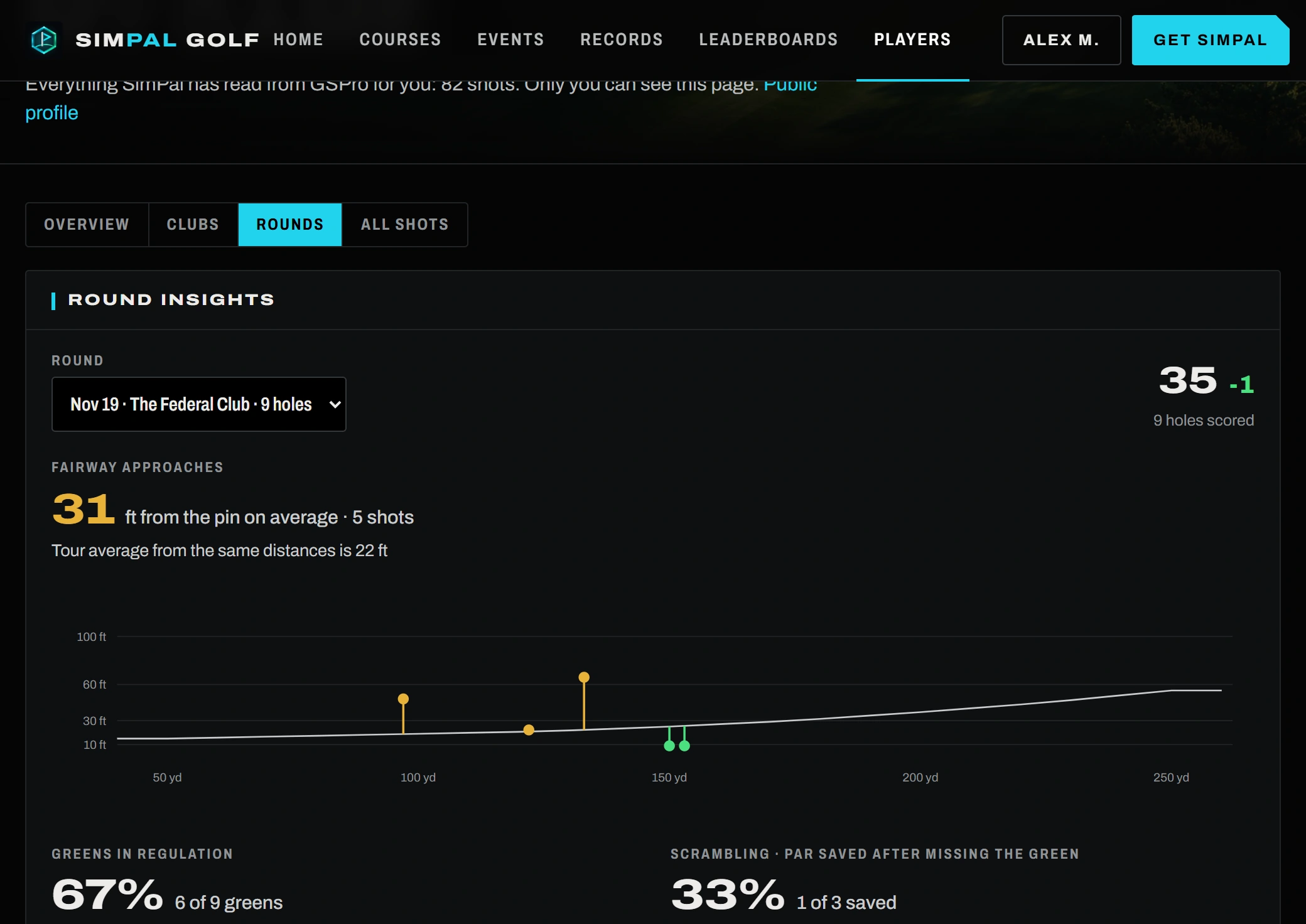
See where the strokes went.
After a round, SimPal shows how close your approaches finished, the greens you hit by distance, and what your misses cost.
- Strokes gained in every part of the game
- Scorecards and course records by tee box
- All of it on your computer too
Set up in two minutes
No cables, no extra hardware, no changes to your launch monitor. Want every detail, with pictures? Read the step-by-step setup guide.
Install on your sim PC
Run the installer on the Windows PC that runs GSPro. SimPal starts quietly with Windows from then on.
Scan the QR code
Open the free SimPal Golf app on your iPhone or iPad (or your camera on Android) and scan the QR code SimPal shows. That's it, you're connected over your Wi-Fi.
Play
Control the game, watch it live and see every shot's numbers, all from the device in your hand.
Simple, yearly pricing
Try everything free for 3 days, then keep SimPal Pro for one yearly price. Prices in US dollars. The phone and tablet app is always free.
Free trial
- Every feature unlocked
- No card required
- Your shots and stats stay when you subscribe
SimPal Pro
- License for one sim PC
- Unlimited players and devices
- Every update included, installed automatically
- Rounds, records and your public profile
- Email support
Questions, answered
Does it work with my launch monitor?
Yes. SimPal works with GSPro itself, not your launch monitor, so if your launch monitor works with GSPro, it works with SimPal: Uneekor, Foresight, Garmin, Rapsodo, SkyTrak and more.
What do I need?
A Windows 10 or 11 PC running GSPro, and an iPad, iPhone or Android device on the same Wi-Fi. Nothing else to buy or plug in.
Does it need the internet?
Your phone or tablet talks to your sim PC over your own Wi-Fi, so the remote, Live View and shot data work on your home network. SimPal uses the internet to start your trial, check your license, install updates and, if you sign in, share your rounds and records on simpalgolf.com.
How does the shot data work?
SimPal reads the data tiles you've turned on in GSPro after each shot, the same numbers you see on screen, and saves them automatically. Turn on more tiles in GSPro to get more stats.
Is there an iPhone or iPad app?
Yes: SimPal Golf is free on the App Store for iPhone and iPad. It finds your PC by itself, scans the QR code and keeps your screen awake. On Android, scan the QR code with your camera and SimPal opens in Chrome; use "Add to Home screen" for an app icon. An Android app is on the way.
What happens when the trial ends?
The remote and Live View stop until you subscribe to SimPal Pro. Nothing is deleted: every shot, round and record you saved during the trial is still there when you unlock it.
How does the yearly subscription work?
SimPal Pro is $49.99 a year and renews automatically on the same date each year. Your key stays the same, so there's nothing to re-enter. To cancel, click Cancel auto-renew in your account (or email support@simpalgolf.com) before your renewal date: SimPal keeps working until the end of the year you paid for. If you stop, your shots, rounds and records stay on your PC and on your profile.
Can I get a refund?
Try every feature free for 3 days first. If you subscribe and SimPal doesn't work on your setup, email us within 7 days of the payment and we'll fix it or refund you. See the refund policy.
Where do my rounds and course records go?
When you play a round in GSPro, SimPal keeps the scorecard for everyone in the bay. Sign in to a free SimPal account and your rounds appear on your profile, on the course pages, and on the course record boards. You choose whether your profile is public.
Lost my key, or got a new PC?
Sign in to your account with the email you subscribed with. Your keys are there, and you can remove an old PC so the key works on your new one.
How do I get help?
Email support@simpalgolf.com and we'll get back to you, usually within a day.
Is SimPal made by GSPro?
No. SimPal is an independent product built for GSPro players. It isn't affiliated with or endorsed by GSPro.